
How to Withdraw From ClickLancers To Binance
To withdraw to your mobile money wallet or bank account, you first need to have an account at www.binance.com.
To receive USDT in your Binance account, you will need to follow these steps:
Sign in to your Binance account.
Click on the "Deposit" button in the top right corner of the screen.
Select "USDT" as the cryptocurrency you want to deposit
You will be provided with a unique USDT deposit address.
Copy the USDT deposit address provided to you.
On your clicklancers account add the USDT address on your payment options page ON THIS LINK
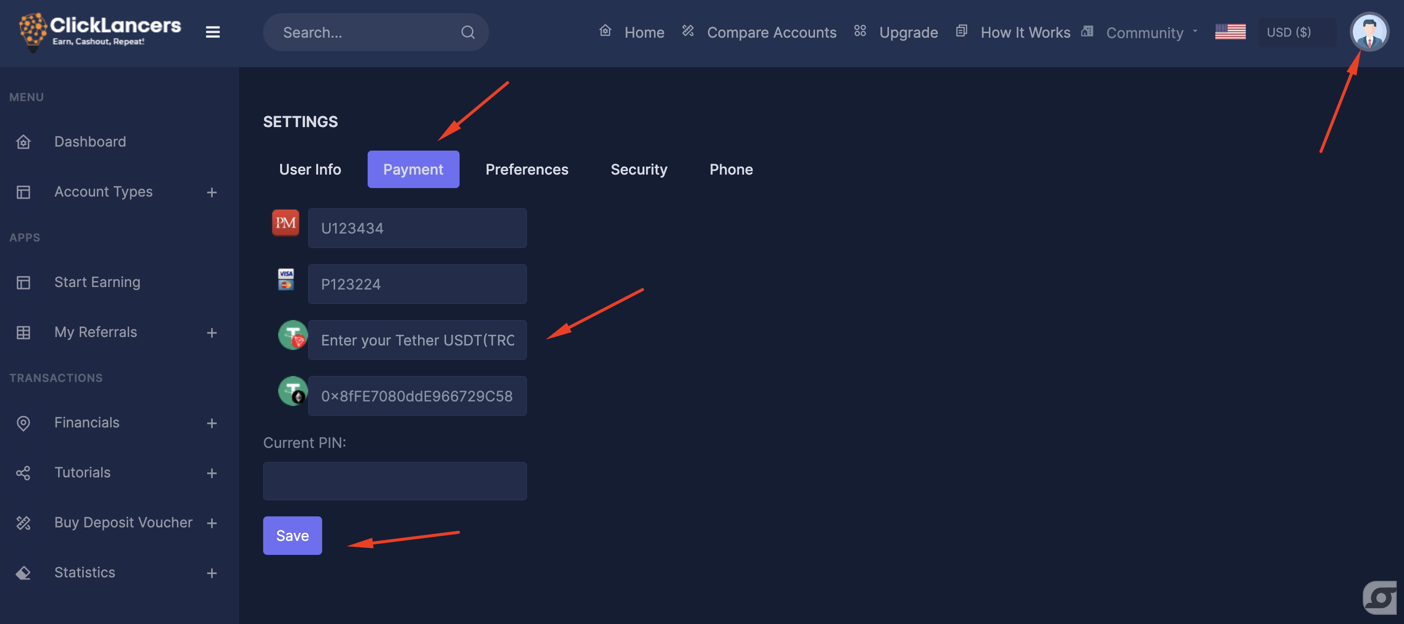
We will receive the request and send the USDT to your Binance USDT deposit address, it may take some time for the transaction to be processed and for the funds to appear in your Binance account.
Once the funds are in Binance, you can go to the P2P section and sell the USDT you receive from Clicklancers to a local trader instantly and you get paid directly to your bank or mobile money or any payment processor in your country.
Please see this video on how to do P2P on binance
PLease Note: Ensure when generating the address on Binance you choose TRON Network because Clicklancers sends money to your USDT- TRC20 wallet. This helps avoid high network/ transaction fees.
To receive USDT in your Binance account, you will need to follow these steps:
Sign in to your Binance account.
Click on the "Deposit" button in the top right corner of the screen.
Select "USDT" as the cryptocurrency you want to deposit
You will be provided with a unique USDT deposit address.
Copy the USDT deposit address provided to you.
On your clicklancers account add the USDT address on your payment options page ON THIS LINK
We will receive the request and send the USDT to your Binance USDT deposit address, it may take some time for the transaction to be processed and for the funds to appear in your Binance account.
Once the funds are in Binance, you can go to the P2P section and sell the USDT you receive from Clicklancers to a local trader instantly and you get paid directly to your bank or mobile money or any payment processor in your country.
Please see this video on how to do P2P on binance
PLease Note: Ensure when generating the address on Binance you choose TRON Network because Clicklancers sends money to your USDT- TRC20 wallet. This helps avoid high network/ transaction fees.
Updated on: 28/03/2023
Thank you!