
How to withdraw Using Mobile Money via Yellow Card
To withdraw to your Mobile money wallet you first need to have a www.yellowcard.io wallet. if you do not have one download on apps store.
To receive USDT in Yellow Wallet, you will need to follow these steps:
Sign in to your Yellow Card account.
Navigate to the "Receive" section of your account dashboard.
Select USDT as the cryptocurrency you want to receive.
You will be provided with a unique USDT wallet address.
Enter the wallet address you got from yellow card into your clicklancers settings page in the USDT field ON THIS LINK
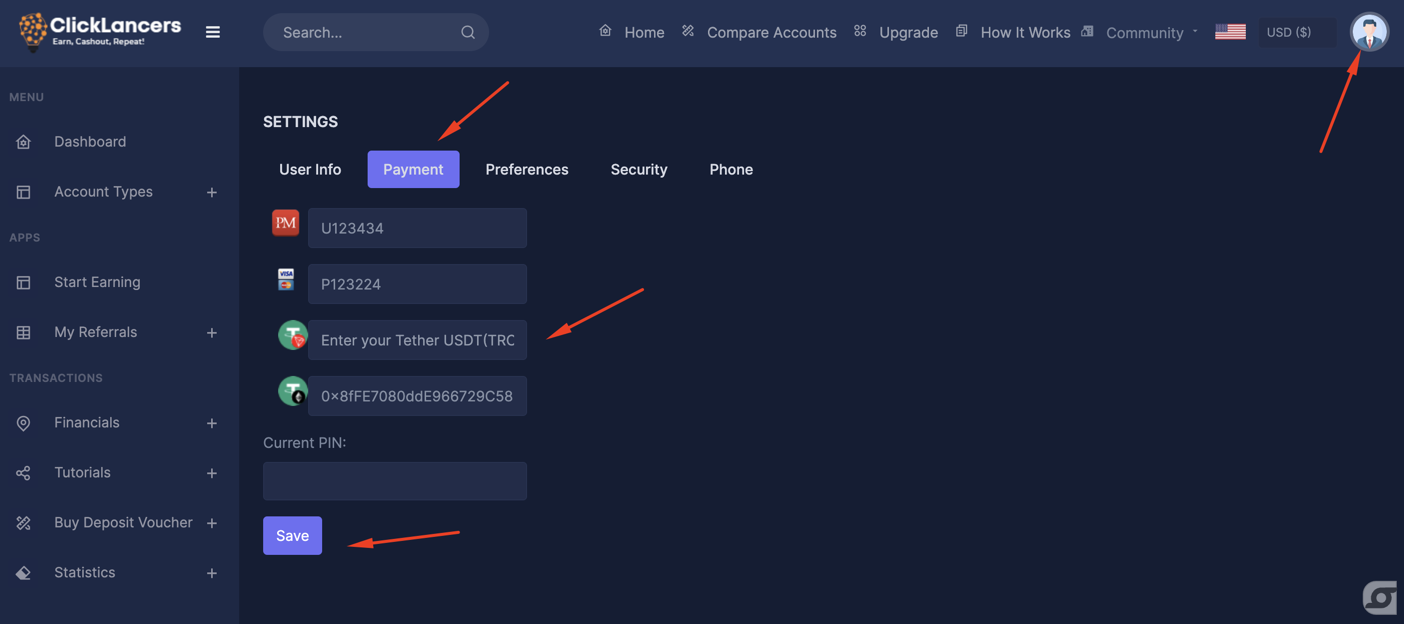
Enter the amount you need to withdraw and proceed to withdraw
We will receive the request and send the USDT to your Yellow Coin USDT deposit address, it may take some time for the transaction to be processed and for the funds to appear in your Yellow Coin Wallet.
Once the funds have been successfully transferred, you can use withdraw it via mobile money or bank account for Zambian Kwacha.
You can check this video guide with a detailed procedure.
To receive USDT in Yellow Wallet, you will need to follow these steps:
Sign in to your Yellow Card account.
Navigate to the "Receive" section of your account dashboard.
Select USDT as the cryptocurrency you want to receive.
You will be provided with a unique USDT wallet address.
Enter the wallet address you got from yellow card into your clicklancers settings page in the USDT field ON THIS LINK
Enter the amount you need to withdraw and proceed to withdraw
We will receive the request and send the USDT to your Yellow Coin USDT deposit address, it may take some time for the transaction to be processed and for the funds to appear in your Yellow Coin Wallet.
Once the funds have been successfully transferred, you can use withdraw it via mobile money or bank account for Zambian Kwacha.
You can check this video guide with a detailed procedure.
Updated on: 14/03/2023
Thank you!